Cooking the Books (or, Baking My MacBook Pro Logic Board)
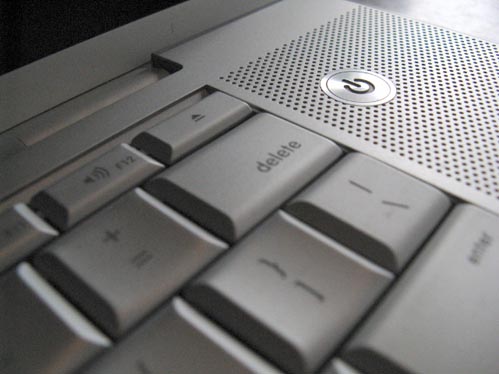
Well, it’s taken me a little while to get this post up—not to mention the fact that its taken me a long while to get any posts up—but I thought this one was worth it just as an encouragement for anyone else who might be dealing with a fried MacBook Pro logic board that is out of the AppleCare warranty coverage. I also needed to get this post up before I forgot most of the details.
As a little background, I put my MBP (17″ 2.5GHz-early 2008, Model A1261 to be exact for you that are searching) to sleep by closing it up for the night, which I’ve done for the past 2+ years with no problems. The next morning I noticed that the glowing power light on the latch release was off and thought it strange and then went to open and wake it and nothing happened. After futilely trying to wake it by varying degrees of banging on random keys and quickly pressing the power button I waited several minutes before I committed to powering it down. After powering it down, I tried to start it back up. While I could hear the hard drive spin up and the optical drive go through its start-up whirrings, there was no start-up chime and no effort to display anything on screen. I tried all the start-up key combinations to start in safe-mode, reset PRAM, start diagnosis—nothing worked. Tried to insert original system install disk and boot from that, all to no avail.
After going through the Apple Support boards, I could not determine a culprit and since there are no Apple Stores closer than the 330 miles to Seattle yet (soon in Spokane I hear), I resorted to taking my system to the only certified Apple Repair shop in Spokane. We were hoping that it would fall under the Nvidia Graphics chip issue so that Apple would cover the replacement (note to self: on future MacBook Pro purchases: Get the full three-year AppleCare coverage!). Since the system would not even get past the initial boot phases, there was no way to even diagnose any other problems. Which AppleCare concluded that it would not fall under the Nvidia replacement program. Which that meant it would be in the neighborhood of $1000-1200 to replace logic board ($800 logic board + labor)—which is not much less than the $1200-1400 my system in good condition was going for on ebay. I’ve since gathered the necessary courage (and tools) to do it myself, so I could save the labor charges in the future. I also found a resource that I might consider as well if I had to face the issue of replacing the logic board again; DT&T Service claims they can replace my model logic board with a refurb for $450. Maybe next time…
I was faced with trying to sell the dead MBP on Craigslist or ebay whole for $600 or try to recover more by dismantling it out and selling the parts on ebay and maybe be able to make up to $800. I determined that the time and effort involved in managing that many auctions wasn’t worth it and posted it on Craigslist. I got exactly two calls on it—one by one of the techs at the shop who diagnosed it originally to ask if I’d ruled-out the Nvidia issue (doh!) and the other by a guy who was tempted to buy it to try to fix it, but just didn’t have the time—he asked if I had considered “baking the logic board”. He quickly countered my skepticism with a plea to Google the term and that I’d find a plethora of advice on how to do it. (Update: when I wrote this, I couldn’t find the contact info for him but just recently found it. Here’s his link: http://www.spokanepcrepair.com/) So I did and he was right-there’s a bunch of crazy gamers out there resurrecting dead graphics cards, Xboxes and logic boards.
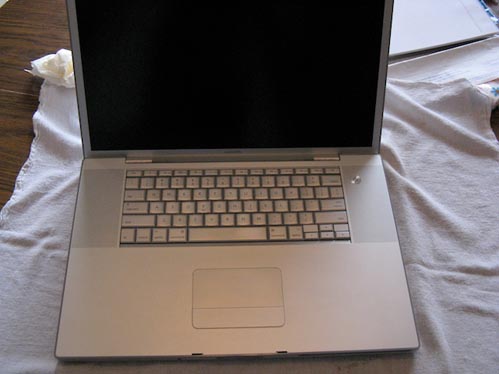
I’ve never been afraid to get under the hood and swap out RAM, replace a hard drive or optical drive, but removing the logic board from an expensive laptop (at least when it was bought), was a little beyond my comfort zone. Figuring I had nothing to lose if I messed up the logic board I found some helpful videos on YouTube that showed how to disassemble my MBP and remove the logic board. After running out to get a better selection of Torx screwdrivers, I found this video helpful (with the exception of the backing music):
After successfully removing the logic board, I then proceeded to prep it for inserting it into the oven. Now if getting into the guts of a $3K+ computer doesn’t make you nervous enough, then actually taking the most important and expensive element out and sticking it into an oven should do the trick. One of the things that nobody covered very carefully, was how much of the additional plastic parts should be removed before inserting into the oven. I was initially fearful after reading several posts where the user would actually remove ANYTHING that was plastic and re-solder it back on afterwards. I wasn’t really committed or prepared to do that. I was most nervous about the USB, DVI and Firewire ports because there was no way I was going to be able to remove those and put them back on. I concluded that they have to be made up of at least heat-resistant plastics, and I hadn’t read or seen anything that lamented melted ports and that I should be OK.
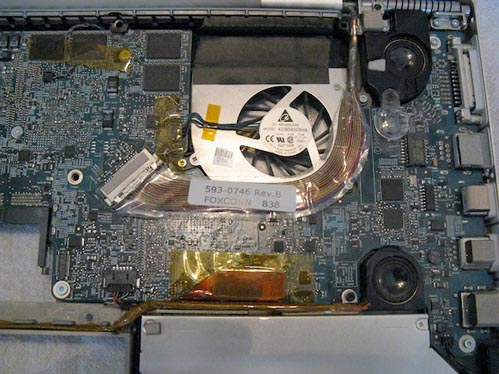
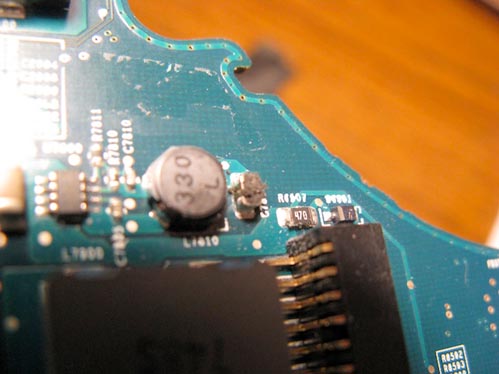
I was careful to remove a piece of foam cushioning that is attached to the board and placed it back on afterward.
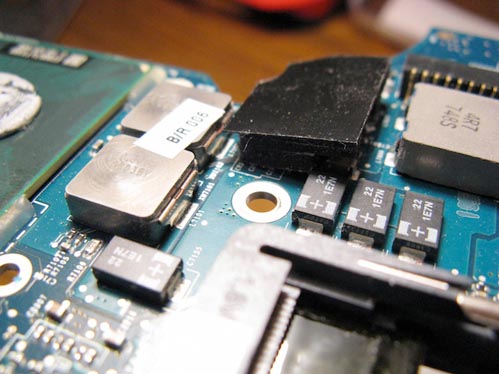
Here it is after I removed the foam piece:
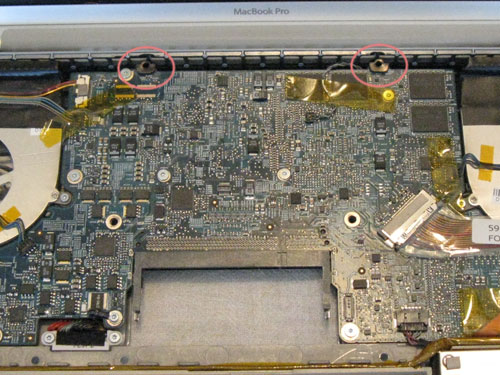
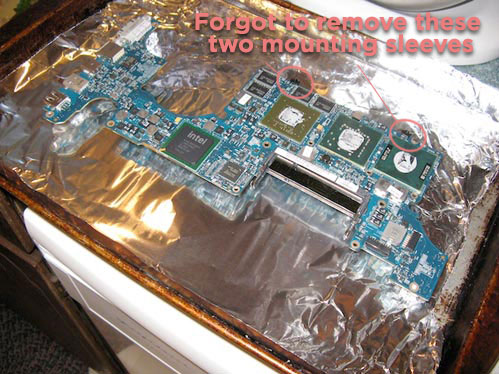
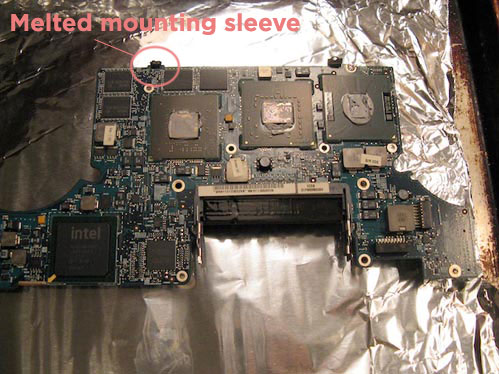
One thing (actually two) that I did not think to remove were the two sleeves for mounting screws that are located at the top of the board (see circled areas in image below). I thought they were metal, but they turned out to be not-so-heat-resistant plastic and I unfortunately learned that lesson the hard way. They are no longer the best part of the securing system of my logic board. I managed to recover one, but the other was toast.
The instructions I followed for baking came mostly from this post on Overclockers. I preheated my oven to 375° F (helpful marital tip: coordinate with spouse if attempting to do this anywhere close to dinner time—trust me on this). I placed the board on rolled-up balls of foil (not sure why—just doing what I saw in the other pics) on top of cookie sheet covered with foil (to catch the grease drippings, or melted plastics I suppose—thankfully there was neither).
Time to take a deep breath… At this point, it should be noted that we actually gathered the whole family around to pray for God’s mercy and that He might bless this endeavor in that it was affecting my ability to provide for the said whole family. It was time to start baking…
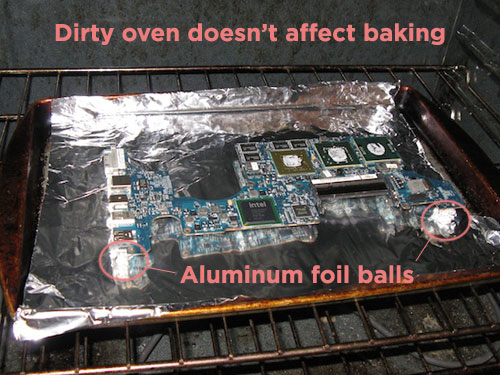
After reading through numerous posts (well over 20 or so) about different temperatures and times to bake for, I settled on 7m:30s at 375°F for these two reasons: one is that most of the realistic sounding posts hovered between 7 and 8 minutes so I thought 7:30 should do it. And the other was after reading several posts that 375° would be sufficient to soften the soldering joints to just barely the melting point allowing them to reseat better and where anything over 400°F would melt the soldering too much—along with all the other plastics and burn the stickers.
It’s not easy holding your breath for over 7 minutes, but with prayer, we persevered (it was a family event at this point). After letting the board cool for about 10 minutes (I think “rest” is the proper cooking terminology), it was now time to start on the process of putting the board back in the case.
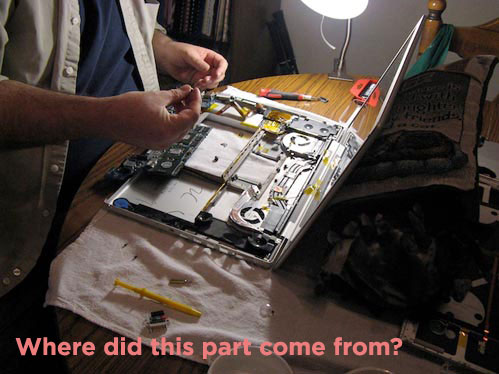
One thing that helped immensely in the re-assembly process was that I took pictures with my digital camera of all the critical assembly points so that I could reconstruct it all back together to the original condition. With the exception of the oft-pointed out melting of the mounting screw sleeves, everything went back together smoothly and with all the family gathered around (actually they were out watching a movie because it was pretty boring watch me put the machine back together) to hear the delightful start-up chime and watch the screen flicker to life and post a question mark because I hadn’t put the original hard drive back in. But that question mark was a beautiful thing, because it meant that it was alive and looking for a suitable, bootable drive. I had removed the hard drive and placed it in an external enclosure so that I could access it from my older system to at least be able to get some work done and also to initially rule out that it was a hard drive issue. I wasn’t worried about losing my data, as I use Apple’s Time Machine and had my drive backed-up. Putting the hard drive back in was fairly quick to do, and after that was in, the system booted up beautifully.
Well, I don’t have any pics or video of it coming to life but suffice it to say, that I’m typing this post on it and have been working on it happily for the last (almost) 30 days and thankful to the Lord in showing His mercy. I’ve read that there are no long-term guarantees with this fix and to not expect it to last forever. How long that turns out to be, I’ll be sure to post in the future, but I’m taking the precaution of planning for its imminent replacement (hoping my system doesn’t take that last statement personally).
There does seem to be a casualty after the baking in that since I’ve made the fix, it looks like I lost one of my USB ports on the left side closest to the power plug. It provides power to the device, but the device (both input and disk) is not recognized. That and the fact that I had to re-enter all my passwords as once the board’s battery is disconnected, the OS X Password Keychain is wiped. So, that’s a bummer, but well worth the trade-off of having a working system back.
If I could recommend anything to anyone in the future of how to prepare before an event like this happens is, in addition to keeping your drives backed up (at least with Time Machine), is to have a good password manager with all your passwords stored—specially if you have multiple email accounts and website accounts in Dreamweaver that you manage.
And finally, be sure to give a hearty and heart-felt thanks to a gracious Lord who has shown us mercy indeed! Hallelujah!
(Update on Aug. 24, 2011: After hearing of so many success stories of others inspired by this article and baking my MBP six times [five more times after this article], one of the important steps that I did not perform during this bake and therefore did not include in this article is to be sure to clean the old thermal paste off of the processors and the corresponding heat sinks. And then to re-apply a quality thermal paste to the processors and heat sinks. The first five bakes lasted for various durations between one month and four with the average being two to three months before having the problem again. Each time, I failed to clean the old and apply new thermal paste. On the sixth bake, I finally did that and have not had to bake again since Feb 24, 2011 [exactly 6 months so far]. I have detailed this in my post: My MBP is Officially Hexed—But There’s Hope, please read that in addition to this post before baking. Also, as of today, I have counted a total of at least 22 people who have successfully cooked their books and posted back on one of the “Baking the Books” articles—so hopefully, that will give you hope.)






I just did this with a macbook pro i paid 40 dollars for and it works……my family and friends think its crazy but haha i got a 2008 mbp for really cheap!
Hello Russel,
Thank you for you instructive and informative logicboard recipe. My early 2008 macbook pro is back up and running. I am also a Spokane local!
Cheers,
Austen
What also helps is to install the smc fan control app and leave the fans turned on high at all times! Although this will run your battery down faster, it will prevent over heating.
Worked for me!
$60 for a 17 inch 2007 macbook pro. Sold it later on for $240. Loved it though.
Just did this with my late 08 MacBook Pro and it worked better than expected. I recommend washing the board with 90% isopropyl before baking to clean everything up and make sure you replace the thermal paste, my Mac is now running as cool as the day I got it. 10/10 would bake my Mac again.
Thanks for the steps. Just baked my board. Seems to be working fine now. This laptop has been dead for over a year! Now any tips on remembering your password?
Works like a charm, Everett’s in the HOUSE !
Hey Russel,
Thank you for you blog – it helped me a great deal last week! In the beginning of the year, I had a run in with hot water spilled on a carpet, where my MBP was resting…
It did not turn on, and Apple told me to rather buy a new one, as repairing it would be too expensive.
I bought some screw drivers, and decided that this expensive toy will be the very first laptop I open myself 🙂 – as I could not do anything with it anyway.
Upon inspection, I could not see any water damage etc. and decided to try out baking it, as per your instructables…
It worked!
My baby is up and running, and I am eternally grateful!
It works. I tried it my self and i even made a video just to see if it works or not.
Here is my video https://youtu.be/lCHTgYkBXoY
Give it a go guys.
Hi , this worked perfectly, in addition to the process i bought a Type K thermocouple & Thermometer to get the temperature right, and suspended the end of the thermocouple over where board would be, waited until temperature is just right and loaded the board for 7.30 minutes.
After the cooking period i allowed board to cool at first quickly to 160C and then slowly from 160C to 35C over 30 mins by leaving the oven door open with the fan oven turned off, this keeps the solders from cracking easily again, as the dry solders often caused by far too rapid cooling.
Non of the connectors were damaged and work perfectly, do apply thermal paste, this is key to not having the repeat of this issue.
I have cooked my Mac 6 times now…..seems like every time I do it it does resurrect and works flawlessly but only for maybe 4-5 months then it’s back in the oven. One of these times it will die but I got a couple years of use out of a dead
I baked at 340 fahrenheit for 7 min 30 seconds and unfortunately the Macbook Pro (A1260, 2008) lasts only around two weeks before the problem happens again (press power button, fans start for a sec then everything powers down).
Have done the whole baking procedure two times already, maybe next time I’ll try increasing the temperature to 375 and see if it lasts any longer!
Hi Kati, check the cables on the fans and that the thermosensors are working alright, i purchased new thermosensors from ebay and replaced them, as the Mac book model in question is terrible at thermally managing itself, i added a software app where i can regulate the fan speed myself and monitor temperatures.
Oh yeah and replace thermal paste on the processor and the graphic chips, if not replaced each time you take the board off it means that it is not transferring heat properly.
As for the process get couple of thermocouples and follow through my additional recommendations above,
Rapid cooling of solder joints could mean problem can come back quickly as the solder joint cracks again.
Worked for me! Closed the lid on my 2011 MB Air one afternoon, and when I opened it, nothing. Not even a chime. Just a black screen, and the only way you could tell whether it was on or off was if you wait thirty seconds, the fan would spin up.
Notably, I baked my Air at 300° F for eight minutes. I don’t think it’s doing anything to the solder – must be something else. But whatever it was, it’s working, at least long enough to get everything backed up and start hunting for a new machine. PTL!
Please to report that this method is still working in 2020. Just brought my A1260 15″ MacBook Pro back to life by following your posts, so thanks for putting these up!
just use a heat gun or blow dryer to target just the video card and have a small kitchen temperature reader – the Logic board in stove method is archaic and dangerous.
Worked like a charm. Mine was dead after plugging in a USB-stick. Tried all other options on the internet, no luck. This one worked 🙂
Should have tried it earlier, as I have also fixed broken video-cards the same way, and also wifi on iPhones (heating a jackplug :-)).